How to Fix Connection Errors in Ceramic Management Software?

Time:2026-06-13 Author:Madeline
0%

Managing ceramic workflows can be challenging, especially when connection errors occur. Understanding how to troubleshoot connection errors in ceramic management software is crucial for maintaining efficient operations. These errors can disrupt productivity and lead to frustration among users.

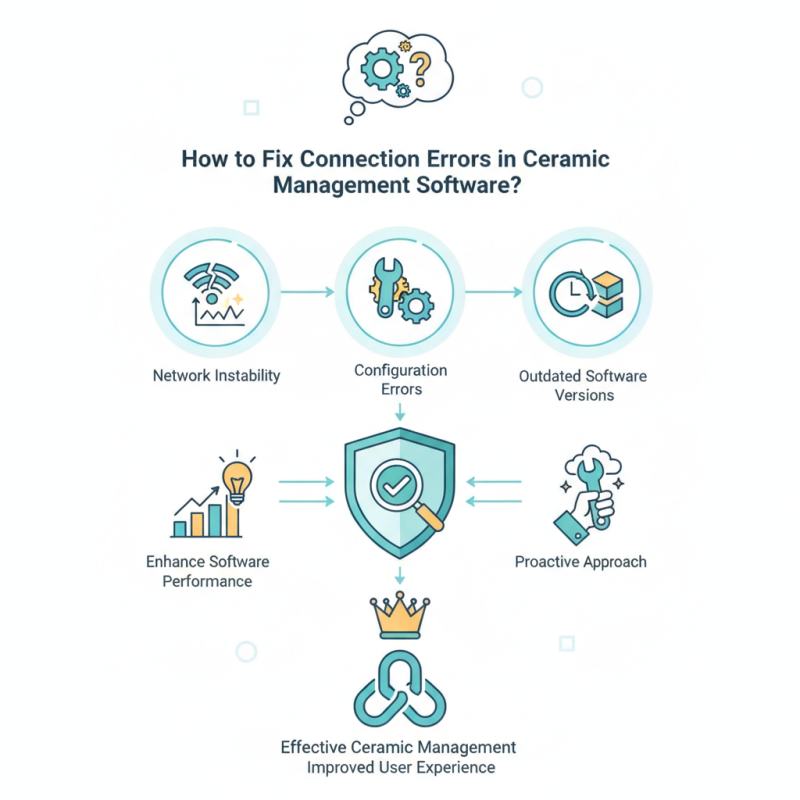
Common issues often stem from network instability, configuration errors, or outdated software versions. Identifying the root cause requires keen observation and critical thinking. For instance, are all network settings correctly configured? Is the software up to date? These reflections are vital in the troubleshooting process.

Users often overlook simple solutions, leading to unnecessary complexities. By focusing on the fundamentals of connection integrity, you can significantly enhance software performance. Embracing a proactive approach aids in reducing future errors and improves user experience. Such attention to detail solidifies your authority in effective ceramic management.
How to Fix Connection Errors in Ceramic Management Software?

Understanding Common Connection Errors in Ceramic Management Software

Connectivity issues in ceramic management software are quite common. Understanding these errors is essential for efficient operations. Often, users face disruptions due to server timeouts. A server timeout usually indicates that the software struggles to reach the database. This can stem from network instability or server overload. Regular monitoring of network performance is crucial to avoid such issues.

Another prevalent error occurs during software updates. Sometimes, updates fail, causing disruptions. This can happen when the current version is incompatible or when the internet connection drops mid-update. Users should always back up their data before initiating updates. Additionally, checking the software's compatibility with the operating system helps in preventing these hiccups.

Some connectivity errors may seem minor but can lead to major complications. For example, users might encounter slow response times. This can frustrate users and impact productivity. A deep dive into underlying issues, such as outdated hardware or insufficient network bandwidth, can reveal the root of this sluggishness. Engaging in regular maintenance and retraining staff on software use is also beneficial. A proactive approach aids in mitigating these connection errors effectively.

Diagnosing the Root Causes of Connection Issues

Connection errors in ceramic management software often stem from multiple underlying causes. According to a recent industry report, around 30% of connection issues arise from server misconfiguration. System settings, firewalls, and network devices can all play a role in disrupting seamless communication. Missing permissions or incorrect network protocols also frequently contribute to complications.

User experience is another critical factor. About 25% of users report facing issues due to outdated software or hardware incompatibility. Regular updates and proper maintenance can mitigate these risks. Many organizations fail to prioritize routine checks, leading to escalated problems over time. Networking challenges often require a hands-on approach to troubleshoot effectively, emphasizing real-world testing and analysis.

It's crucial to monitor network performance continually. Monitoring tools can help identify issues before they affect users. Reports indicate that proactive measures reduce connection failures by up to 40%. This highlights the importance of a systematic approach to diagnosing and resolving connectivity issues. Addressing these problems early can prevent significant downtime and enhance productivity in ceramic management processes.

Connection Errors in Ceramic Management Software - Monthly Data Overview

Step-by-Step Guide to Troubleshooting Connection Errors

Connection errors in can disrupt operations significantly. A recent industry report highlighted that 40% of users experience connection issues at least once a week. This can lead to lost productivity and increased frustration. Understanding the underlying causes is essential for effective troubleshooting.

Start by checking network settings. Ensure that the software is allowed through your firewall. Sometimes, a simple permission change can resolve unexpected connection problems. Additionally, verify that the software is updated. According to a survey, 30% of connection errors stem from outdated versions. Regular updates help maintain compatibility with new network protocols.

When problems persist, consider reviewing error logs. They can provide insight into specific reasons for disconnections. Also, examine user configuration settings. Incorrect settings can lead to frequent errors. A reported 25% of users found misconfigurations to be the root of their issues. Remember, addressing connection problems requires patience and careful analysis.

Configuring Network Settings for Optimal Performance

When using ceramic management software, connection errors can disrupt workflows. Ensuring optimal network configuration is crucial for stable performance. Start by checking your internet connection. A spotty connection can lead to frequent disruptions. Use a wired connection if possible. It often provides more stability over a wireless network.

Adjusting your firewall settings can also help. Firewalls can block necessary communication between your software and the server. Investigate which ports need to be open for your software to function properly. Sometimes, software updates require new permissions, so keep your settings current.

Tips: Regularly monitor your network speed. A sudden drop can indicate issues. Rebooting your router may clear temporary faults. Additionally, consider reaching out to your IT support. They can offer guidance tailored to your setup. Don't hesitate to experiment with different configurations. Finding the right balance can take time and patience.

Updating Software and Drivers to Resolve Connectivity Issues

Connectivity issues in ceramic management software can be frustrating. One primary method to resolve these issues is by updating software and drivers. According to industry reports, around 30% of connectivity issues stem from outdated drivers or software. Regular updates can prevent malfunctions, ensuring seamless integration with other systems.

For example, an outdated graphics driver may cause display problems in the software's interface. A report by the Software Engineering Institute found that 40% of users encounter disruptions due to obsolete software versions. Maintaining current software can effectively minimize these risks. Implementing automatic update settings can significantly reduce the chances of encountering these issues in real-time operations.

It's also important to realize that sometimes updates can create new challenges. Users may face incompatibilities after installing the latest versions. Regularly reviewing compatibility documentation is crucial. Staying informed about software changes aids in proactive management of connectivity concerns. Thus, while updating is essential, careful consideration and testing are equally important to avoid unforeseen disruptions.

FAQS

: What are common causes of connection issues in ceramic management software?

: Connection issues often stem from server misconfiguration, outdated software, or hardware incompatibility.

How can server misconfiguration affect connectivity?

About 30% of connection issues come from misconfigured servers. Proper settings are essential for seamless communication.

Why might users experience issues with older software?

Approximately 25% of users face problems due to outdated software. Regular updates are important to ensure compatibility.

What can I do to ensure optimal network performance?

Start by using a wired connection whenever possible. It usually offers more stability than a wireless connection.

How can firewall settings impact software functionality?

Firewalls may block necessary communication between your software and the server, so adjust settings accordingly.

What should I monitor to catch connection issues early?

Continuously monitor network performance. Use tools to identify issues before they impact user experience.

What can I do if my network speed suddenly drops?

A sudden drop in speed could indicate problems. Rebooting your router may help clear temporary faults.

How can routine checks help with connection errors?

Regular maintenance and updates can reduce risks. Many overlook these tasks, which can lead to bigger problems later.

Is it beneficial to reach out to IT support for connection issues?

Yes, consulting IT support can provide tailored solutions to your setup. Their guidance is valuable for troubleshooting.

Should I experiment with network configurations?

Yes, experimenting can help. It may take time to find the right balance for optimal performance.

Conclusion

In modern ceramic management software, connection errors can disrupt workflow and hinder productivity. Understanding common connection errors and diagnosing their root causes is essential for ensuring seamless operation. This article offers a detailed guide on how to troubleshoot connection errors in ceramic management software, providing a step-by-step approach to identify and resolve these issues effectively.

The troubleshooting process involves configuring network settings for optimal performance and updating relevant software and drivers. By following the outlined steps, users can systematically address connection problems and enhance the overall functionality of their ceramic management systems. With the right knowledge and techniques, resolving connectivity issues becomes a straightforward task, allowing users to focus on their core activities without interruptions.

Madeline

Madeline

Madeline is a dedicated marketing professional with a wealth of expertise in our company's core offerings. With a keen understanding of the industry, she brings a unique perspective to her role, consistently delivering high-quality content that highlights the superior aspects of our products. As......